






On Scale Webinar Recordings
November 17th, 2011
Recently I gave two webinars on how we handle scale at AppNexus.
Recording of these webinars are now available online! Enjoy: Part I and Part II.
I’d love to hear feedback. What do people agree/disagree with? What are things I didn’t cover you’re curious about?
On Scale Webinar!
October 1st, 2011
I gave a tech-talk on scalability a few months back and due to popular demand will be doing it as a two-part webinar this coming Thursday the 6th and Wednesday the 11th the week after! Details below…
AppNexus CTO Mike Nolet on Scale – A Two-Part Webinar Series
AppNexus co-founder and CTO Mike Nolet will be presenting a two-part series on scalability and ad serving. He’ll lead interactive discussions on how AppNexus built a global infrastructure to manage 14+ billion ads/day, with a deep dive into how AppNexus handles this volume, collects the data, aggregates it and then distributes both log and real-time data back to our customers.
In part one, Ad Serving at Scale, Mike will discuss:
– Designing the core infrastructure for AppNexus’ global cloud platform.
– Load balancing (global/local) 300,000 QPS
– AppNexus’ tech stack and how we manage this scale.
– No-SQL / key-value stores and building a global cookie store with over 1.5 billion keys 150,000 write requests/second.
In part two, Data Aggregation at Scale, Mike will cover:
– Bringing 10TB of data a day back to a single location, 24/7/365.
– Aggregating 10TB of data a day to generate a simple single report for our clients.
– Leveraging technologies like Netezza, Hadoop, Vertica and RabbitMQ to provide top notch data products to our customers.
To register for Part 1: Ad Serving at Scale, on Thursday, October 6th at 11am-12:30PM EST, click here: https://www3.gotomeeting.com/register/983170710
To register for Part 2: Data Aggregation at Scale, on Wednesday, October 12th from 11am-12:30pm EST, click here: https://www3.gotomeeting.com/register/360458342
The New Display Ecosystem — Part I: A few words on HYPE.
July 17th, 2011
It’s been four years since I wrote one of my most popular series of blog posts of all time — “The Ad Exchange Model”. Since then a lot has happened. A whole slew of three letter acronyms has appeared: DSP, SSP, DSP, RTB… Venture capital investments have exploded, we have multiple blogs dedicated to ad-exchanges and it looks like the space has gotten a lot more complicated.
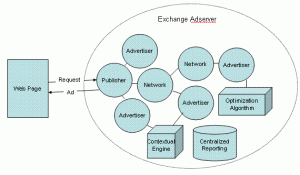
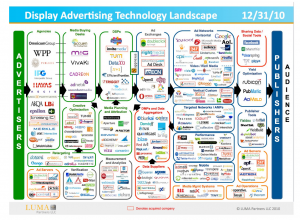
Or put another way… in 2007 I described the world with a simple diagram. Today Terry Kawaja has an industry “LUMAscape” that has logos so small I can’t even read them.
Wow. What the hell happened? We used to have this easy world… publishers sold to advertisers, there was one exchange and then a lot of ad-networks with different pitches. How the hell did we get from there to the above hodge podge “ecosystem” that nobody understands. To help bring some clarity to this world I’d like to kick off a new series… “The RTB Display Ecosystem”. This first post is will primarily be musings on hype… as before we can talk about what’s really happening we all need to step back for a second and realize 90% of what we read is… well… bullshit. I’m sure by now you’ve seen the below diagram. It’s confusing, cluttered and supposed to explain to the world how the new Display ecosystem works. 100s of companies have incorporated this slide in their presentation. I haven’t gone to a single conference where this hasn’t come up multiple times.
How VCs and Bankers brought hype to the industry
Here’s the hard truth people don’t like to hear. The display world is actually not that complicated. Yes the ecosystem has evolved. Exchanges are core tenets of display and there certainly has been a ton of innovation in the data space. But that doesn’t make for 20 boxes on a slide. What really happened is that online advertising captured the attention of silicon valley… complete with a massive influx of VCs, $, TechCrunch posts and of course… HYPE.
You see, Venture Capitalists make money off of home runs. The top companies in a category get great exits, and after that valuations drop off very quickly. To actually be able to justify an investment a VC has to be convinced that the company has a chance at being top in it’s category. Well, this is quite hard to do if the world were simply advertisers, publishers and ad-exchanges. So what do you do? Well… you create a new category, pump millions of dollars in a company marketed as such category, and then hype up this category on TechCrunch as the next greatest thing and rejoice.
Of course VC’s have coffee with each other, hype up their investments to their VC friends (ever heard of an “Echo Chamber”?), and now they’re all clamoring to invest money in other companies who could vie to be a winner in the category and a new slew of companies gets funded.
In 2006 it was impossible to differentiate yourself as an ad-network… and thus every ad-network rebranded as an exchange. In 2007/2008 nobody could raise money as an “ad exchange” that would compete head-to-head with Google and Yahoo. But “SSP” worked out quite well… even though it’s exactly the same business model (queue funding for Rubicon, Admeld & PubMatic, etc.). In 2007/2008 you also couldn’t raise money as an ad-network, but there were plenty of companies interested in helping advertisers spend their money… enter the “DSP” category (queue funding for MediaMath, Turn, Invite Media, etc.). What’s funny is that TMP was doing the SSP business before anybody else and Ad.com has been offering “DSP Services” since .. well, forever!
VCs are also obsessed with investing in “Technology Companies” that build “Scalable Platforms”. You see, Technology is supposed to be sticky. Platforms have ecosystem effects and become $1b companies. To adapt, companies have quickly adjusted their positioning to better reflect attributes that will attract high valuations from said Venture Capitalists. Again, ad-network isn’t sexy, but a technology “Demand Side Platform” is. The funny thing is… it’s hype yet again. Most companies on the LUMAscape slide receive the majority (if not all) of their revenue from media services and not technology fees. Now this line is blurring (more on that later) but what companies are doing is saying they are “technology providers” while behind the scenes they operate exactly like a media company. An “SSP” technology provider hands out tags to publishers and then pays them a check at the end of the month together with a nice excel sheet. This is exactly the same business model of many an ad-network.
Don’t get me wrong — I’m not saying that any of the aforementioned companies aren’t or can’t be great companies. Many of the companies I mention have built terrific technologies and great businesses and some have followed that up with successful exists. But, they did all capitalize on a great marketing opportunity, at the expense of some “old world” companies who were too slow to react.
And this is where VCs and Bankers are actually hurting the industry rather than helping. They are reinforcing the importance of new categories that in themselves shouldn’t necessarily exist. Rather than focusing truly on what a company does they repeat and hence validate what companies say they do.
So what’s next?
Well first, let’s stop the hype cycle and start celebrating real successful businesses for what they have accomplished. Give me more case studies of real results and less BS!
In the coming blog posts I’m going to lay out the new RTB ecosystem and how all the different parties are interacting. Your feedback is as always invaluable so please leave comments with specific topics you’d love covered.
Mikeonads entering the 2010s… adding Disqus & Twitter
July 17th, 2011
It’s actually sort of sad that I’m a CTO yet the wordpress on my blog basically hasn’t been touched since 2006.
Based on some feedback I’ve now incorporated twitter (#mikeonads) into the blog and also migrated all my comments over to Disqus.
I’m pretty social media retarded so please give some feedback on how to best incorporate twitter into the blog for better discussions!
Tech Talk on Adserving & Scalability Thursday May 18th
May 17th, 2011
This Thursday at 7PM I’ll be presenting a “Tech Talk” here in NYC on scalability & adserving. Specifically I’ll be talking about how we built the AppNexus global infrastructure to manage 10+ billion ads/day with a deep dive into how we collect, aggregate and then distribute both log and real-time data. This is definitely for a technical audience so stay away if bits and bytes aren’t your thing.
Details can be found here. Thanks to AOL ventures for hosting and kudos to Charlie O’Donnell from First Round Capital for organization the event!
Right Media’s Predict
March 23rd, 2011
Over the past few years, the one recurring question I’ve gotten from a number of people is — “Hey, how does Right Media’s predict work?” For obvious reasons I was never really able to answer the question.
Well, the patent we filed back in August of 2007 has finally been issued and is the information is now in the public domain. You can find the full patent here. It’s in lawyer-speak so a bit hard to read, but the diagrams show some interesting things. Of course, this is now four-year-old code & modeling which has certainly been updated so I’m not sure how useful it is, but if you asked me in late 2007/early 2008 how this all worked, now you know! Of course, if you want to rebuild it you’re in tough luck, because it’s patented!
The diagrams are particularly useful for understanding how it all worked. I won’t pretend to be able to explain this well after being completely disconnected from it for four years, but I pulled a few excerpts that are interesting to read for those that lack the patience to interpret lawyer speak.
The “tree” model:
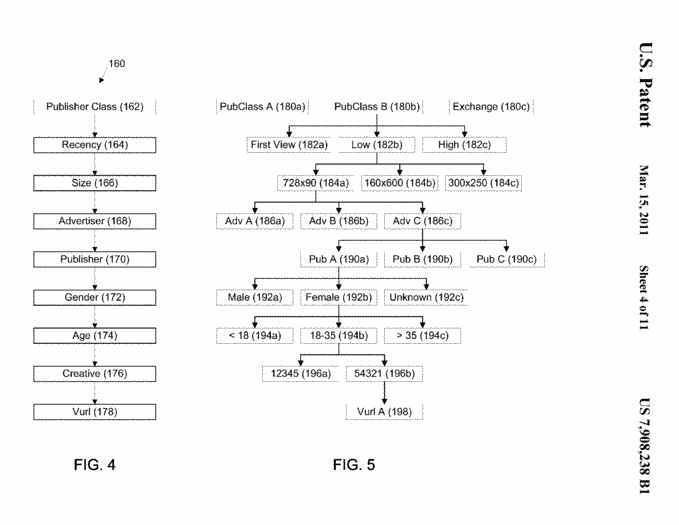
Where probability represents the probability of the user taking the respective action for the node, success represents the number of times that the advertisement has been successful in generating the desired response (e.g., a click,a conversion), tries represents the number of times an advertisement has been posted, and probability.sub.parent represents the probability for the parent node on the tree structure (e.g., the node directly above the node for which the probability isbeing calculated). As summarized in table 1 below, what is meant by tries and successes varies dependent on whether the probability being calculated is a click probability, a post-view conversion probability or a post-click conversion probability.
[...]
When a node has a low number of tries, then the probability of the parent node has a greater influence over the calculated probability for the node than when the node has a large number of tries. In the extreme case, when a particular node haszero tries and zero successes, then the probability for the node equals the probability of the parent node. At the other extreme, when the node has a very large number of tries, the probability of the parent node has a negligible impact on theprobability calculated for the node. As such, when the node has a large number of tries, the probability is effectively the number of successes divided by the number tries. By factoring in the parent node probability in the calculation of a node’sprobability, a probability value may be obtained even if the granularity and/or size of the available data set on its own precludes the generation of a statistically accurate probability.
Learning Thresholds / “Aspiring CPMs”
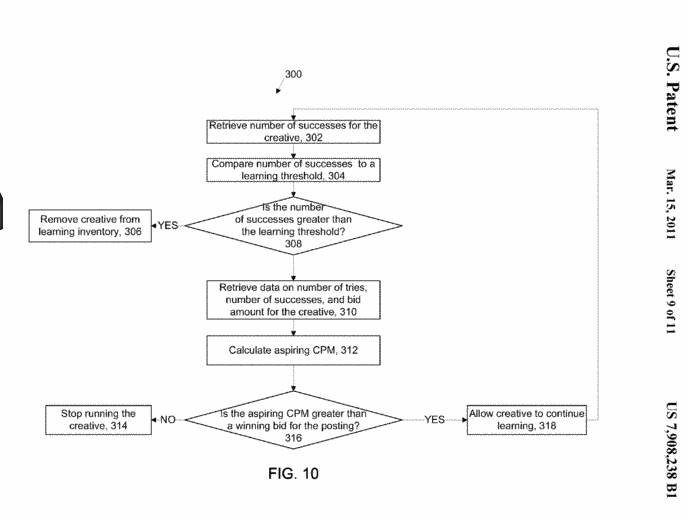
FIG. 10 shows a process 300 for determining whether to continue learning for a particular creative based on the upper and lower limits. The transaction management system 100 retrieves a number of successes for a creative (302) and compares thenumber of successes to a threshold that indicates an upper limit on the amount of learning for a particular creative (304). If the number of successes is greater than the threshold, the transaction management system 100 removes the creative from thelearning inventory (306). Once the creative is removed from the learning inventory, the number of tries and successes generated during the learning period are used to determine a probability that a user will act on the creative (e.g., as describedabove). This probability is subsequently used to generate bids for the creative in response to a publisher posting an ad request.
Deciding on a learn vs. optimized creative:
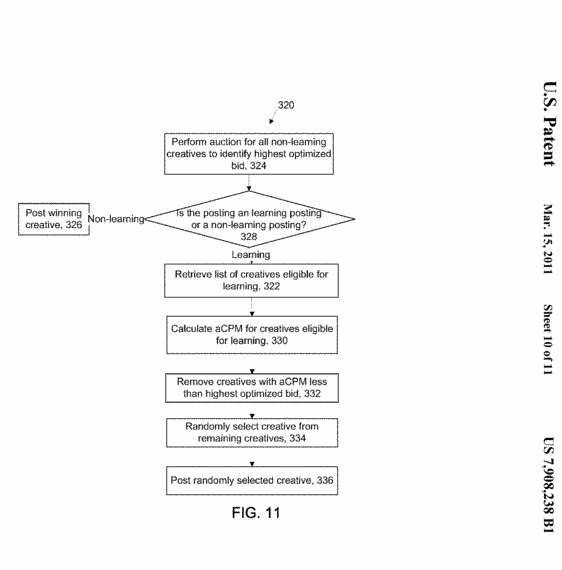
In order for learning to occur, the transaction management system 100 devotes a percentage of the posted advertisements to learning creatives. The allocated inventory for learning is used to allow creatives to receive sufficient impressions togenerate information on the probability of a user taking action when the advertisement is posted. FIG. 11 shows an auction process 320 for selecting an ad creative to be served in responsive to an ad call received by the ad exchange. The transactionmanagement system 100 performs an auction among the non-learning creatives on the ad exchange to identify the highest optimized bid (324). Since a limited amount of inventory is devoted to learning, the system determines whether the ad call is allocatedto learning or is for non-learning (328). If the ad call is for non-learning, then the winning non-learning creative is posted in response to the ad call (326). If the ad call is allocated for learning, then the transaction management system 100retrieves a list of creatives eligible for learning (322). The list of creatives eligible for learning can be determined as described above. For the learning creatives, the transaction management system 100 calculates the aCPM for the creativesincluded in the list of creatives eligible for learning (330). Based on the calculated aCPM, the system 100 removes any creatives for which the calculated aCPM is lower than the highest optimized bid (332). The transaction management system 100randomly selects one of the remaining learning creatives (334) and posts the randomly selected creative in response to the ad call (336).
Gotta love quality ads…
October 28th, 2010
Saw this ad floating around today and I just have to share… “Who Has Better Hair? Justin Bieber or the bear”.
I mean… it even rhymes. Quality quality creative work!

Top 5 Media Startup Mistakes
October 7th, 2010
My first title for this post was “top 5 ad-network mistakes”… then I realized that ad-network was a “bad” term… so intead I’m going to refer to a “media startup”. I’ll put networks, DSPs, trade-desks, dynamic creative providers… any company that buys & sells media (*cough* … looks like a network.. *cough*) under this new “media startup” bucket.
It seems every young media startup I talk to keeps making the same mistakes over and over. Well, here goes in no particular order (even though they are numbered #1-#5) my list of things every startup needs to watch out for… maybe I can help prevent someone from making the same mistake!
#1 – Credit / Payment Terms
A $1M insertion order is amazing.
A $1M insertion order where you get paid net-90 but you pay out net-30 can kill your business.
A $1M insertion order where you get paid net-60 but you pay out net-60… can also kill your business.
Here’s the problem. Agency margins have been on a nose dive downwards for years now. One of the ways agencies drive up their profitability by paying everybody late and making a little extra $ on the interest they earn by keeping the money in their bank account. Even if you think the payment terms line up, just one client that sits on their check for too long can be tdetrimental to your business. If you don’t pay your big sellers they cut you off, killing your network. If you push to hard on the agency, they cut you out of next quarter’s budget.
Proper float & credit management is a must for any network. Have an open conversation with agencies and understand when you can realistically expect to be paid, and then make sure there’s always enough cash in the bank to pay sellers and publishers (and employees!). Many a media startup has gone out of business by badly managing their float.
#2 – Boobs
Did you know that perezhilton.com, wwtdd.com and idontlikeyouinthatway.com are present in some shape or form on every single exchange and supply platform from the aggregators (PubMatic, Rubicon, Admeld, OpenX, etc.) to the big guys (Right Media, Google)? These “Entertainment” sites make liberal usage of pictures of scantily clad celebrities, their sexcapades and lots of other inappropriate content.
Now on a normal remarketing campaign the performance might be great, but there’s nothing worse than an angry email from your advertiser because your ads just showed up next to this page.
In the best case your reputation just took a little hit. In the worst case your advertisers simply refuse to pay out multi-hundred thousand dollar budget amounts…. ouch.
It’s imperative that a network or buying desk has a strategy in place for managing inappropriate and sensitive content. Don’t assume that the “Entertainment” channel is fun sites that you can run any advertiser on… you’ll be in serious trouble if you do. On RTB you obviously get the URL, so use it. Supply platforms also have various forms of brand protection… Advertising online is kind of like teenage sex… first take a sex-ed class to learn what the forms of protection are … and then don’t forget to use protection in practice!
#3 – Malvertisements
Here’s a very common story. One of your sales guys comes in super excited… he just closed an *amazing* deal. $0.75 CPM, no goals, all european countries for a major brand-name advertiser with a huge $100k budget. To top it off, the buyer will pre-pay $50k up front and promises net-15 payment terms.
The deal goes live… and within 24-hours exchanges shut you down and all of your publishers turn off their tags because for some strange reason all of their visitors are complaining that you are trying to install some sort of trojan/malware program with your ads
Yep, there’s bad guys out there that will pay you serious cash to run ads that are really viruses in disguise. When you load them from the office they behave. Enter night-time and they turn into nasty beasts that will cost you publisher relationships, a bad rap with Sandi and potential scrutiny from the feds.
General rule of thumb… if the deal is too good to be true, it probably is. Google has done a terrific job setting up a website to educate the industry about this on www.anti-malvertising.com. Make sure every single one of your sales & ops staff reads this entire site in detail.
#4 – Not Focusing on Sales
If you are building something that’s amazing & scientific, it’s probably the wrong thing to build. No seriously… If you have even one PhD on staff you’re probably doing something wrong.
Quarter after quarter at Right Media I’d work with a team of engineers to push out improvements & features to the optimization system to increase efficiency, ROI & spend. You’d think that in a business running several billion ads a day that this would be the single largest driver of company revenue. Yet… one sales guy at the original Right Media “Remix” Ad-Network single-handedly blew me out of the water one quarter with a single insertion order… and the deal didn’t even use optimization.
Relationships matter… a lot. Not every buyer out there just wants to buy into a magic black box that will auto-magically uber-optimize their life. Advertising is, believe it or not, about more than just clicks & conversions. There’s an inherent understanding of the target audience and the media and buyers want to work with companies that understand how they are thinking and who they are looking for. This means that the buyer wants to talk to someone he can relate to, who listens to him and who he can trust.
This is why every media startup needs a strong sales team. You might have the greatest technology in the world, but if you can’t sell it, it’s not going to get you far. The smart guy in the room? They’re the ones that hire the sales guy that will close the multi-million $ deal. [The above mentioned sales guy went to work for Invite Media, now of course a Google company...]
#5 – Over building technology
To some extent this is a follow-up on the previous point, but so many companies I talk to seriously over-build their technology. The market today is simple. Yes, we will definitely be in a world one day with “traders” sitting at terminals with tickers and fancy secondary future markets and involvement from some of Wall St’s finest…. just not today.
Today, one great trafficker/optimization analyst can beat almost any algorithm out there A team of 5 temps working for a week can apply categorizations to the top 1000 internet sites with similar accuracy to the fanciest semantic engine. A smart BD guy can buy KBB data w/out a deep API integration to a data exchange. A buying strategy of “remarketing” will out-perform any other campaign strategy or behavioral data by at least 10x.
Now don’t get me wrong… there is definitely a market for technology and technology is the only way in which you take the behaviors of brilliant individuals and scale them to be a hundred million $ business. Here’s the problem, most companies start by building technology, then trying to apply it. If you want to be a successful media business you should do the opposite. Hire some great people, watch how they operate, then build technology to automate what they do.
Conclusion…
The above 5 are common mistakes… but there’s one very simple rule of thumb any and every CEO, investor or board member can use to judge the quality of a media startup.
If you ain’t making money, you ain’t doing it right.
Seriously. More than 3 months old with 0 revenue? Likely to fail. Low revenue with high burn? Doomed to fail. The simple answer is it’s easy to get at least one agency to buy in as an early adopter and throw you some $ to “test”. If you can’t do this, you’re doing something wrong!
PS: Shameless self-promotional use of the blog here but… AppNexus is HIRING!!
AppNexus Raises $50M!! And we’re hiring…
October 5th, 2010
I’m super excited to announce that, as of today, we’ve closed on a $50M Series C funding. We’ve raised this round from existing investors and one of our key strategic clients, Microsoft. I think this is a great validation not just of the company, but also of the real-time bidding (RTB) space in general. You can read more about it in our press release found here
Also… we are hiring across the board! We are looking for great talent – especially on the engineering side. From rock-star, amazing engineers and product managers (ranging from junior, entry-level to team leads and directors) to work on data pipelines, adserving and bidding, user-interfaces, web services and general management. If you are someone amazing — or know someone amazing — that might want to work on some crazy, globally-distributed technology, send them my way (mike at appnexus dot com) or check our careers site here: http://www.appnexus.com/careers/
For you less technical folks, we are also hiring for services, account management, finance and marketing!
Comments are back on…
September 27th, 2010
I swear I’m technical and a CTO… but for some reason I can’t seem to operate wordpress. Comments were disabled since yesterday on my new post — they’re now back on, so if you had something to say please come back.
Also, I’ve had a few requests for a twitter feed… I’ll try to set that up soon! So hard to keep up with all these web 2.0 technologies =).
-Mike
